Showing posts with label Walk In My Garden. Show all posts

Thursday, February 19, 2009

acrylic cutting!

I stopped at a wonderful scrap shop on my way home from Omaha today, called Precious Treasures. What a fun store! They had just gotten in the new Cosmo Cricket line, Girl Friday, and I HAD to pick some up. This has to be the most fun retro mod paper around! If you haven't seen it yet go check it out at www.cosmocricket.com. They have several new lines out that are sure to please!

Getting back on track with the topic here...

While I was at PT I found a stack of acrylic sheets. I had noticed that the store had die cut some custom albums, and decided to try to cut the sheets with my Cricut Expression. It cuts! How cool is that? I used my standard test cut turtles and played with the different blades, depths, and machine settings. I found that having either a roland 60 degree blade, or the cricut deep cut blade in the green housing worked best. I set the pressure at max, blade at 6, multicut at 4 and speed at 4. This will NOT cut clean through the acrylic, but it WILL give you a usable cut. You do need to find a flat edge and bend it so the bottom side of the cut is outward until it snaps, then you can start pulling the excess off the cut. It will come right out. I will have to make a video later to show how to do this.
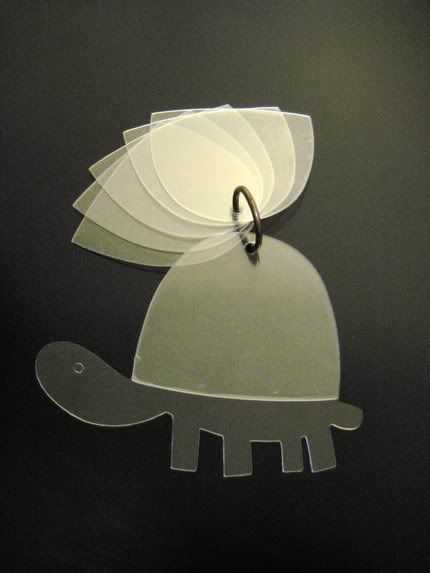
Photobucket
YAY ACRYLIC! I think I will try the sunshine album next!

Tuesday, February 10, 2009

Turtles!

These turtles are soooooooo cute! The turtle cut was the entire reason I bought the Walk In My Garden cartridge. I had the larger one already made, and was playing around with the Cricut deep blade in the regular green housing to figure out ideal settings and needed something small to test, so I cut turtles at 3 1/2". Contrary to what Cricut states, you CAN put the deep cut blade into the regular housing. In fact, you will get better results than using it with the intended blue housing. I was using it with the blade at 6, pressure 4, speed max and multicut 2. It cuts beautifully this way! I did notice there is a difference between making cuts directly from the machine, vs. using design studio. Design Studio slows the machine down too much to be very effective, and I needed to add a 3rd pass, and bump the pressure up to 5. It still worked splendidly.

Anyway, I was left with 4 tiny chipboard turtles after my test cutting. I thought, "why not make some shells, and make keychain albums to go with the full size turtle albums". They turned out super cute, if I do say so myself! I can't wait to get them papered!

Photobucket
Test cut turtles make cute pets!